

Ceph Lab
Deploy and operate a Ceph cluster from scratch.
The lab runs on one bare-metal host with the cluster nodes as virtual machines. You work with them like physical servers, networking included, and the configuration is the one you would use on bare metal. It covers block, file and object storage and shows how Ceph serves as the storage backend for OpenStack.
After the lab you know the cluster components and how Ceph distributes data. You can operate the cluster, replace OSDs and nodes while it is running, and read the health signals when something goes wrong.
- Architecture: MON, MGR, OSD, CRUSH, pools and placement groups
- Deployment and bootstrap with cephadm
- Block storage (RBD), file system (CephFS) and object storage (S3)
- Ceph as storage backend for OpenStack
- Day two: replacing OSDs and nodes, upgrades, failure domains
- Monitoring, health checks and benchmarking
You need: one bare-metal server with virtualization enabled. The lab environment is allocated:
- 🔲 21 vCPUs
- 🗄️ 72 GB RAM
- 💽 1.2 TB disk
Good to know first: Linux, networking, containers and scripting.
Lab
Environment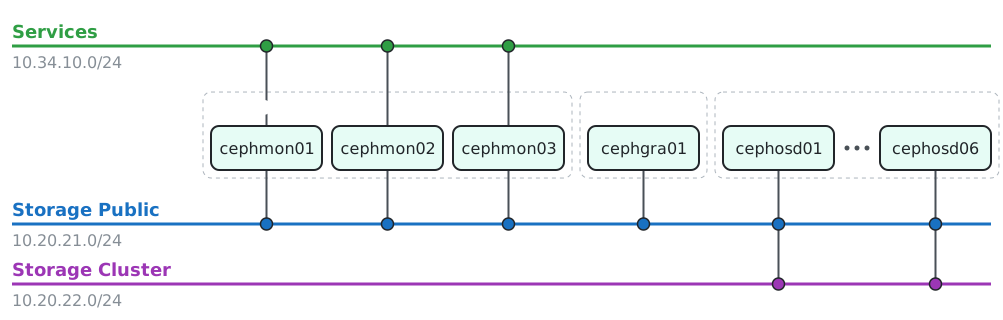
Infrastructure supporting services
| Host | vCPU | RAM | Disks | Air-gapped |
|---|---|---|---|---|
dns |
1 | 4 GB | 4 GB | – |
registry |
2 | 8 GB | 32 GB | – |
proxy |
1 | 4 GB | 4 GB | – |
deployment |
1 | 4 GB | 4 GB | soft |
Lab environment the hosts you work with
| Host | vCPU | RAM | Disks | Air-gapped |
|---|---|---|---|---|
cephmon01 |
1 | 4 GB | 8 GB | yes |
cephmon02 |
1 | 4 GB | 8 GB | yes |
cephmon03 |
1 | 4 GB | 8 GB | yes |
cephgra01 |
1 | 4 GB | 8 GB | yes |
cephosd01 |
2 | 6 GB | 8 + 3×64 GB | yes |
cephosd02 |
2 | 6 GB | 8 + 3×64 GB | yes |
cephosd03 |
2 | 6 GB | 8 + 3×64 GB | yes |
cephosd04 |
2 | 6 GB | 8 + 3×64 GB | yes |
cephosd05 |
2 | 6 GB | 8 + 3×64 GB | yes |
cephosd06 |
2 | 6 GB | 8 + 3×64 GB | yes |
On real bare metal
The same configuration runs on real hardware. The following parts differ:
- Network interface names, bonding, and the split into public and cluster network
- Disks: device names, device classes and the CRUSH rules for them
- Failure domains that match your real racks and hosts
- Provisioning of the servers: PXE, IPMI or BMC access
Workshop slides
Want this delivered as a guided workshop? Write to ping@infraguide.org.