

OpenStack Lab
Deploy and operate a multi-node OpenStack cloud.
The lab runs on one bare-metal host with the cluster nodes as virtual machines. You work with them like physical servers, networking included, and the configuration is the one you would use on bare metal. The VMs you create in OpenStack run on top. The cloud uses Ceph as its storage backend.
After the lab you understand how the pieces fit together and can deploy, administer and extend the cloud yourself. You also have what you need to find and fix the usual problems.
- Multi-node deployment with kolla-ansible
- Core services: Keystone, Nova, Neutron, Glance, Cinder, Horizon, Placement
- Networking with Open vSwitch: flat, VLAN, VXLAN, floating IPs, load balancing
- Day two: replacing nodes, live migration, upgrades, backup and recovery
- Monitoring and central logging with Prometheus, Grafana and OpenSearch
- Automation with cloud-init, Ansible and Terraform
You need: one bare-metal server with nested virtualization enabled. The lab environment is allocated:
- 🔲 64 vCPUs
- 🗄️ 222 GB RAM
- 💽 1.5 TB disk
Good to know first: Linux, networking, containers and scripting.
Lab
Environment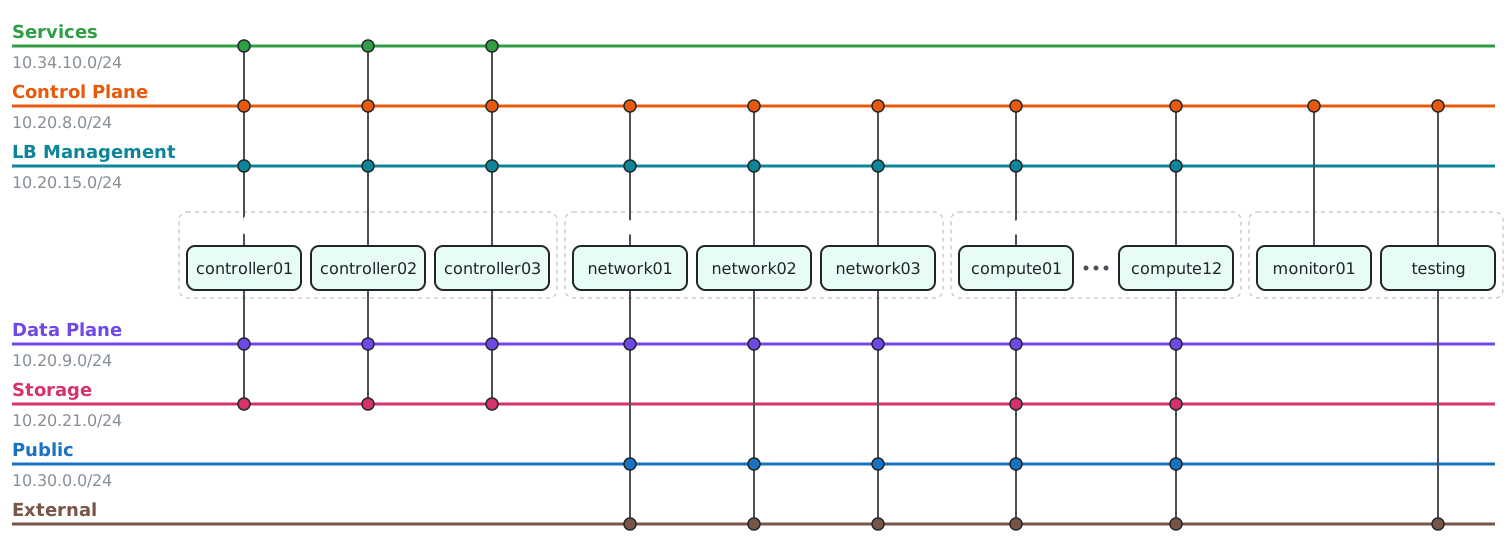
Infrastructure supporting services
| Host | vCPU | RAM | Disks | Air-gapped |
|---|---|---|---|---|
router |
1 | 4 GB | – | – |
dns |
1 | 4 GB | 4 GB | – |
registry |
2 | 8 GB | 32 GB | – |
proxy |
1 | 4 GB | 4 GB | – |
deployment |
2 | 8 GB | 8 GB | soft |
recorder |
1 | 4 GB | 4 GB | yes |
Lab environment the hosts you work with
| Host | vCPU | RAM | Disks | Air-gapped |
|---|---|---|---|---|
controller01 |
8 | 32 GB | 32 GB | yes |
controller02 |
8 | 32 GB | 32 GB | yes |
controller03 |
8 | 32 GB | 32 GB | yes |
network01 |
2 | 6 GB | 8 GB | yes |
network02 |
2 | 6 GB | 8 GB | yes |
network03 |
2 | 6 GB | 8 GB | yes |
monitor01 |
1 | 4 GB | 32 GB | yes |
testing |
1 | 4 GB | – | yes |
compute01 |
2 | 4 GB | 16 GB | yes |
compute02 |
2 | 4 GB | 16 GB | yes |
compute11 |
2 | 4 GB | 16 GB | yes |
compute12 |
2 | 4 GB | 16 GB | yes |
cephmon01 |
1 | 4 GB | 8 GB | yes |
cephmon02 |
1 | 4 GB | 8 GB | yes |
cephmon03 |
1 | 4 GB | 8 GB | yes |
cephgra01 |
1 | 4 GB | 8 GB | yes |
cephosd01 |
2 | 6 GB | 8 + 3×64 GB | yes |
cephosd02 |
2 | 6 GB | 8 + 3×64 GB | yes |
cephosd03 |
2 | 6 GB | 8 + 3×64 GB | yes |
cephosd04 |
2 | 6 GB | 8 + 3×64 GB | yes |
cephosd05 |
2 | 6 GB | 8 + 3×64 GB | yes |
cephosd06 |
2 | 6 GB | 8 + 3×64 GB | yes |
On real bare metal
The same configuration runs on real hardware. The following parts differ:
- Network interface names, bonding and VLAN trunks on the switch
- Disks and partitioning, including the devices used for Ceph OSDs
- BIOS and firmware settings, such as virtualization and boot mode
- Provisioning of the servers: PXE, IPMI or BMC access
Workshop slides
Want this delivered as a guided workshop? Write to ping@infraguide.org.